

What this worksheet helps children practise
For any hour number, multiply by 6 first and attach one zero on the right: 7 h -> 7 × 6 = 42 -> 420 min!
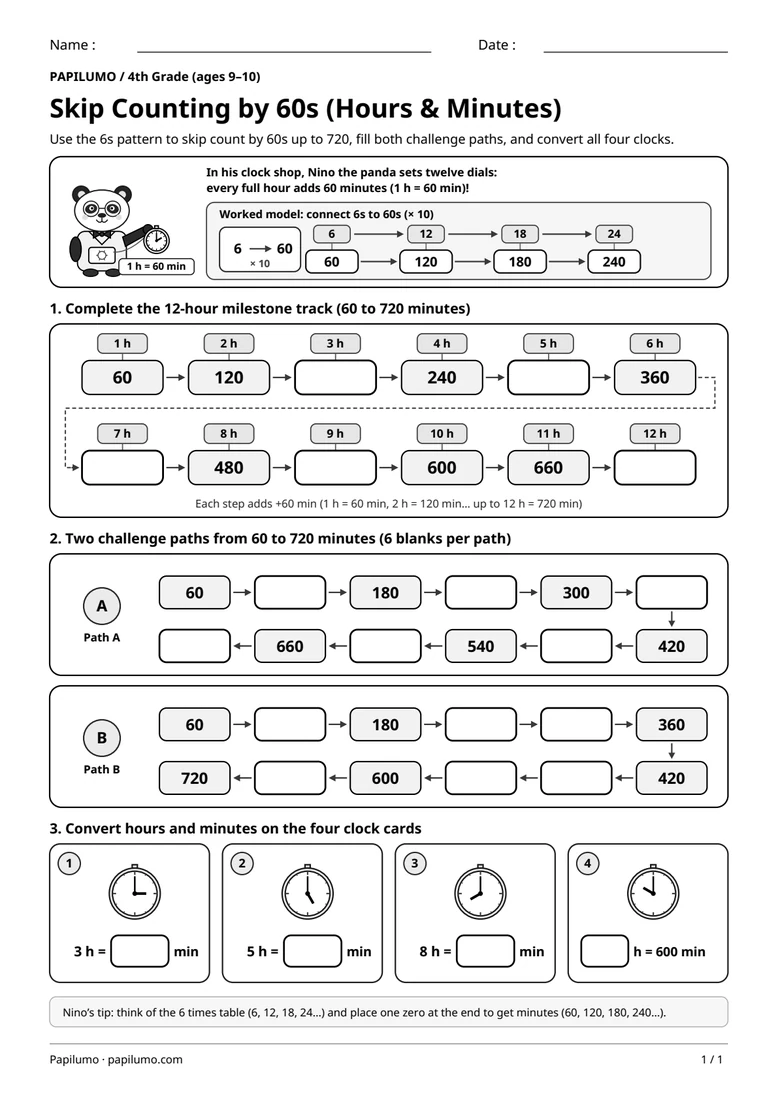
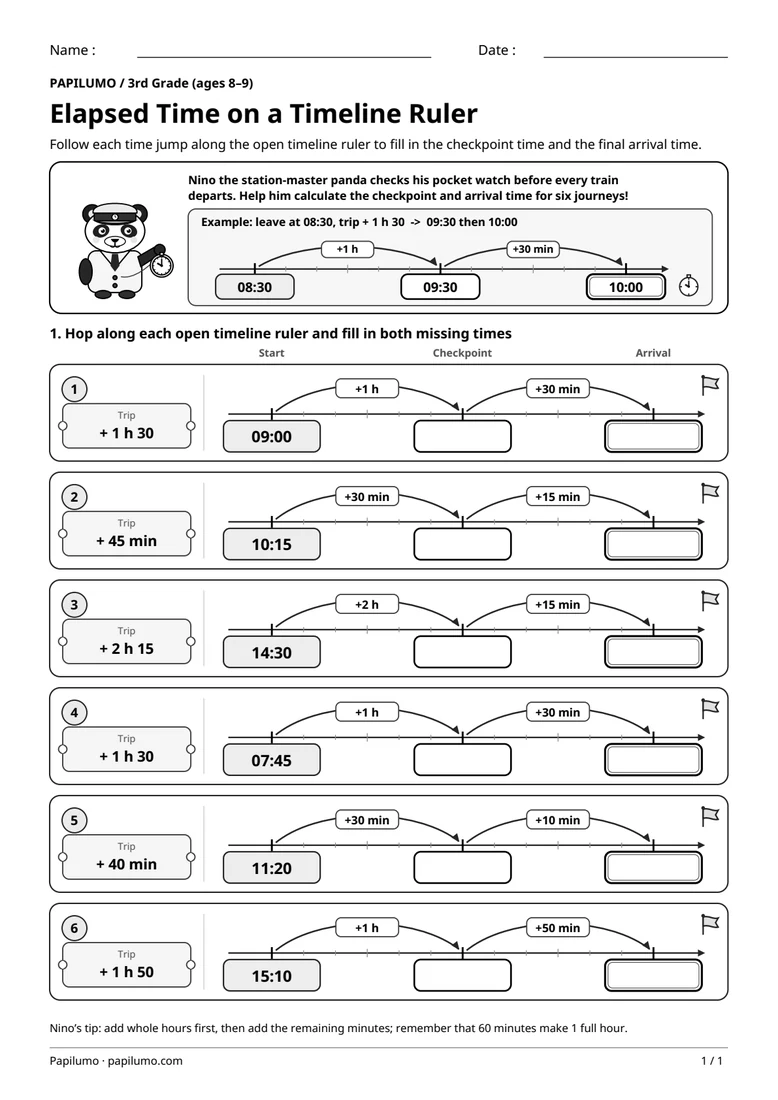
Skip counting by 60s strengthens two core fourth-grade math skills at once: scaling familiar 6s facts by ten (since 60 = 6 × 10) and converting effortlessly between whole hours and minutes. Rather than repeatedly adding 60 on paper at every turn, students notice that the leading digits follow 6, 12, 18, 24, 30, 36, 42, 48, 54, 60, 66, and 72 with a zero appended. That clear structure locks in essential time benchmarks such as 180 minutes for 3 hours, 300 minutes for 5 hours, and 600 minutes for 10 hours. For a related skill, use Elapsed Time on an Open Timeline Ruler with Nino the Panda: Follow each time jump along the open timeline ruler to fill in the checkpoint time and the final arrival time.
Preparing a short session
Print the student worksheet at actual size (100%) on plain white A4 or Letter paper and provide a sharpened pencil and soft eraser; no cutting or extra tools are required. Keep the separate answer key PDF out of sight during independent practice. Before filling in any box, inspect Nino’s pocket watch labeled “1 h = 60 min” together and trace the worked model carefully so your child sees clearly how multiplying by 10 turns 6s into 60s.
A concrete example to get started
In the top example panel, two neatly aligned rows reveal Nino’s clockmaker shortcut at a glance: the top row lists the first four multiples of 6 (6, 12, 18, 24), while vertical × 10 links turn them into the opening 60s sequence right underneath: 60, 120, 180, and 240. Connecting “4 × 6 = 24” straight to “4 h = 240 min” gives fourth graders a reliable mental check before tackling longer multi-step gaps on their own.
Supporting the activity
Part 1 pairs every hour from 1 h to 12 h above its minute milestone: seven values are printed (60, 120, 240, 360, 480, 600, 660) and five are blank (180, 300, 420, 540, 720). Part 2 offers two winding 60-to-720 paths, each keeping six clues and six blanks: Path A alternates clues at 60, 180, 300, 420, 540, and 660, whereas Path B keeps 60, 180, 360, 420, 600, and 720 so students bridge multi-step gaps independently. Part 3 closes with four clock cards: 3 h = [180] min, 5 h = [300] min, 8 h = [480] min, and [10] h = 600 min. To vary the practice, try Morning, Afternoon and 24-Hour Time with Nino the Panda: Read each analog clock, then write its morning time (AM) and its afternoon or evening time (PM and 24-hour).
What to notice and how to check
When reviewing with the separate PDF answer key, check the five Part 1 milestones (180, 300, 420, 540, 720), verify all twelve steps carefully on both Path A and Path B, and confirm the four clock conversions (180, 300, 480, and 10). If a transition such as 360 to 420 or 540 to 600 feels shaky, have the student recall the matching 6s fact aloud first (7 × 6 = 42 so 420; 10 × 6 = 60 so 600) and check back against the 12-hour track.
Making the task easier
Jot down the 6s sequence (6, 12, 18… 72) lightly in the margin first, then attach a zero to complete each minute box.
Keep the learning aim, but reduce how much the child has to handle at once. Cover part of the page with another sheet and reveal one task at a time. Demonstrate a separate example, then leave a real opportunity to work something out. An answer reached with support is still a useful attempt; it does not yet show that the same task can be completed independently.
Taking the idea beyond the worksheet
Continue Nino’s clock track up to 15 h (900 min) on scratch paper and write three reverse puzzles such as “? h = 840 min.”
Use the follow-up to meet the same idea in a different setting. Offer it once the first task makes sense, without insisting that the whole page must be perfect. The child might explain a strategy, make an example or set a challenge for an adult. Return to the worksheet only when it helps connect the two situations. A short conversation or a practical activity can be enough to finish the session. To continue exploring, use Skip Counting by 11s and 12s to 144 with Kiko: Complete the 4 trails by adding +11 or +12 from one stone to the next.
Downloading and printing the PDF
This free PDF contains one worksheet designed for A4 paper. Download the file using the button on this page and open it in your PDF reader. Choose actual size or a 100% scale, check the orientation in the print preview and turn off any browser headers or footers. The illustrations use vector lines, so their outlines stay sharp when printed. Check the margins on one copy before preparing several sheets for a group. The level shown on the page is a guide, rather than a requirement to complete the activity at a particular age.